
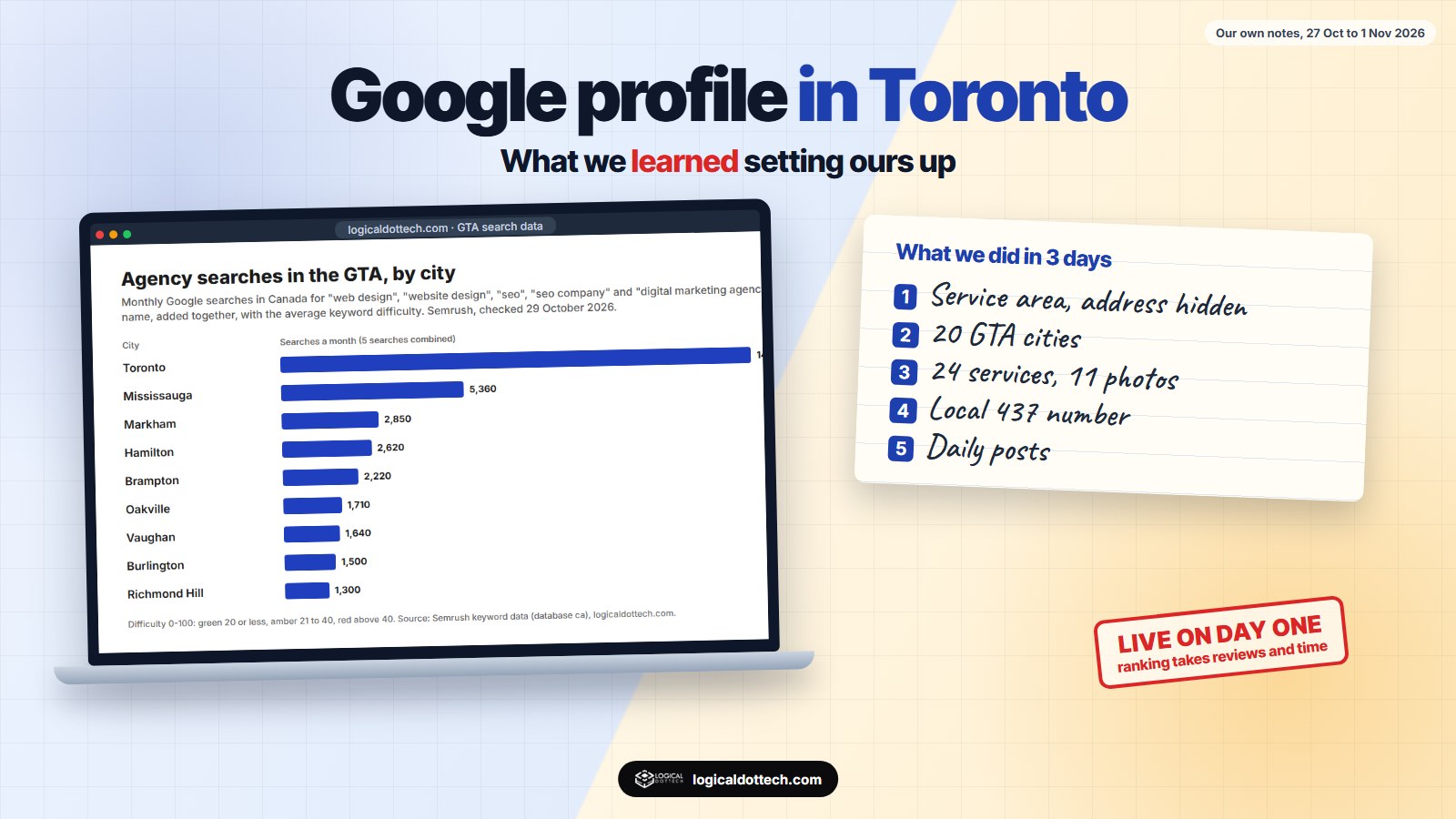
Short answer: we set up our own Google Business Profile for Toronto on 27 October 2026 as a service-area business, with the address hidden, 20 GTA service areas, 24 services and a local 437 number. It was verified and showing on Google Maps the same day. Five days later, with no reviews yet, it was not in the top 20 for our main searches in North York, Mississauga or Brampton. The businesses that were in the top three were all rated 4.7 or higher, with a median of 47 reviews, but one ranked with a single review. Setup is quick; ranking comes from reviews, relevance and time.
We opened a team in Toronto in October 2026. Like any new business in the GTA, the first thing we needed was a Google Business Profile. We kept notes on every step, what Google accepted and refused, and where we stood a few days later. These are those notes, written for GTA business owners setting up their own profile.
How we set it up, step by step
| Date (2026) | What we did | What happened |
|---|---|---|
| 27 Oct | Created the profile with the primary category “Website designer” | Google needs an address or a service area to create a profile, so we entered the address first. |
| 27 Oct | Switched to a service-area business and hid the address | Customers do not visit that address, so it should not show. |
| 27 Oct | Verification | Completed the same day; the profile showed on Google Maps that evening. |
| 27 Oct | Services, hours, photos, extra categories | 24 services, Monday to Friday hours, 11 photos of our team and real work, four extra categories. |
| 27 Oct | Posts | One post live and a post a day scheduled for the next two weeks. |
| 28 Oct | Phone | Added a local Toronto number (437). |
| 29 Oct | Service areas | Added cities up to 20, which is Google’s limit. |
| 1 Nov | First ranking check | Not in the top 20 for our main searches yet. Details below. |
Service area or storefront?
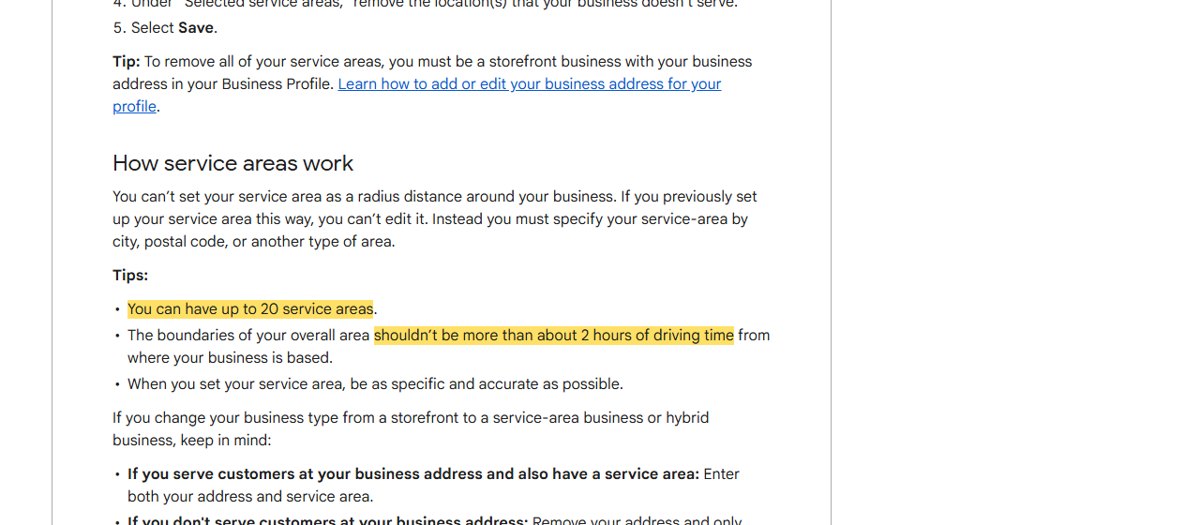
If customers come to you, use a storefront profile with your address shown. If you go to them, or work with them online, set up a service-area business: the address stays hidden and you list the places you serve. Google allows up to 20 service areas and says the overall area should not be more than about two hours’ drive from your base. We cover the rules in more detail in Google Business Profile without a shop address.
Our 20 areas: Toronto, North York, Scarborough, Etobicoke, Mississauga, Brampton, Markham, Vaughan, Richmond Hill, Oakville, Burlington, Pickering, Ajax, Oshawa, Milton, Newmarket, Whitby, Aurora, Whitchurch-Stouffville and Hamilton. Service areas tell Google where you work. They do not make you rank in all of those places; distance from the searcher still matters.
Things that surprised us
- You cannot create a profile with neither an address nor a service area. We had to enter the address first and hide it in the next step.
- Some options are not offered to service-area profiles. Attributes such as “onsite services” and “languages spoken” were refused for ours, even though other profiles show them.
- The category decides the suggested services. For “Website designer” in Canada, Google offered only a handful of ready-made services, such as software development and app development. Everything else we added as our own services with descriptions.
- Desktop Maps did not show our services list, even though Google had them saved. Check the profile on the Google Maps phone app and in the search results panel before assuming something is missing.
- Verification and going live were quick. We expected days; it took hours.
Where we stood five days later
On 1 November 2026 we checked Google Maps from three points: North York, Mississauga and Brampton, for “website designer”, “seo company” and “web design company”. Our profile was not in the top 20 for any of the nine searches. We had no reviews yet. Here is what the top three had:
| Searched from | Search | Reviews of the top three |
|---|---|---|
| North York | website designer | 47, 154, 126 |
| North York | seo company | 43, 4, 44 |
| North York | web design company | 154, 47, 126 |
| Mississauga | website designer | 71, 23, 38 |
| Mississauga | seo company | 121, 47, 53 |
| Mississauga | web design company | 71, 23, 46 |
| Brampton | website designer | 119, 66, 18 |
| Brampton | seo company | 16, 14, 1 |
| Brampton | web design company | 119, 66, 112 |
Across these 27 top-three spots, every rating was between 4.7 and 5.0, and the median was 47 reviews. But the numbers vary a lot by search. In Brampton, the top three for “seo company” had 16, 14 and just 1 review, and in North York a business with 4 reviews was second. A few genuine reviews, the right category and a nearby service area can be enough in some searches; others are held by businesses with over 100 reviews.
Which GTA cities have the most searches?
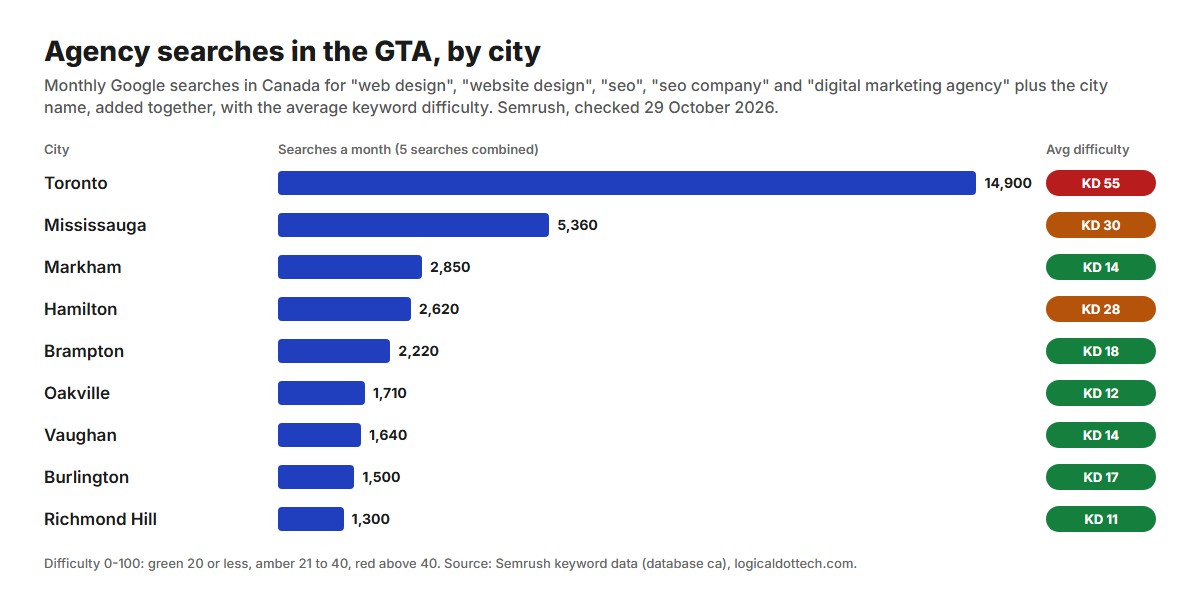
Toronto has by far the most searches, but also the highest difficulty. Markham, Oakville and Richmond Hill have fewer searches with much lower difficulty. For a new business, the smaller cities in your service area are the realistic first wins, both on Maps and in the normal search results.
What we are doing next
- First reviews from real clients in Canada, asked one at a time. Never from family, staff or anyone who has not worked with us.
- The same name, area and phone on Canadian listings such as Yelp, YellowPages.ca and 411.ca.
- A post and a new photo every week, from real work.
- City pages with real content for the cities where we have work to show, starting with Mississauga, Markham and Brampton, linked from our Toronto page.
- A ranking check every two weeks. We will add the results to this article.
A checklist for your own GTA profile
Do
- Use your real business name, exactly as on your invoices and signage.
- Pick the most specific primary category.
- Hide your address if customers do not visit.
- List every service, each with a short description.
- Add real photos of your team and work.
- Use a local number and keep hours accurate.
- Ask real customers for reviews and reply to each one.
Do not
✗ Add “Toronto” or “best” to the name if it is not your real name.
✗ Use a virtual office or mailbox as your address.
✗ Buy reviews or ask family to write them.
✗ List service areas you cannot really reach.
✗ Expect to rank in week one.
How we can help in the GTA
We set up and fix Google Business Profiles and build websites for GTA businesses, from Toronto with support from our team in India. See website design and SEO in Toronto, call us on +1 437-563-8080, or book a free 30-minute call.
Common questions
How long does it take to set up a Google Business Profile in Toronto?
For us, one day. We created our Toronto profile on 27 October 2026, verification completed the same day, and the profile showed on Google Maps that evening. Services, hours and photos were filled in the same day. Your verification method and timing may differ.
Can I hide my address on a Google Business Profile in Toronto?
Yes, if customers do not visit you there. Set the profile up as a service-area business: the address stays hidden and you list the areas you serve instead. Google allows up to 20 service areas, and says the overall area should be within about 2 hours of driving time from your base.
How many Google reviews do I need to rank in the GTA?
There is no fixed number. In our 1 November 2026 check of nine Maps searches across North York, Mississauga and Brampton, the businesses in the top three had between 1 and 154 reviews, with a median of 47, and all were rated 4.7 or higher. In Brampton, the top three for “seo company” had 16, 14 and 1 review.
Which GTA cities have the most searches for web design and SEO?
In our Semrush check on 29 October 2026, Toronto had about 14,900 searches a month across five agency searches, then Mississauga (5,360), Markham (2,850), Hamilton (2,620) and Brampton (2,220). Toronto was also the hardest, with an average difficulty of 55; Markham, Oakville and Richmond Hill were between 11 and 14.
Why does my new Google profile not show up in Maps searches?
A new profile can be live on Google Maps without ranking for any search yet. Ours was live on day one but not in the top 20 for our main searches five days later, with no reviews. Distance, relevance and reviews decide the order, so the first reviews from real customers matter most.
Should I put a city name in my Google Business Profile name?
Only if it is part of your real business name. Google’s guidelines say the name should match how your business is known in the real world, and adding extra keywords can get the profile suspended.
Data: our own Toronto profile set up 27 to 29 October 2026; our Google Maps check from North York, Mississauga and Brampton on 1 November 2026 (top three results, nine searches); our Semrush keyword check for Canada on 29 October 2026. Source: Google Business Profile Help, Manage your service areas. Results differ by search, location and time.