
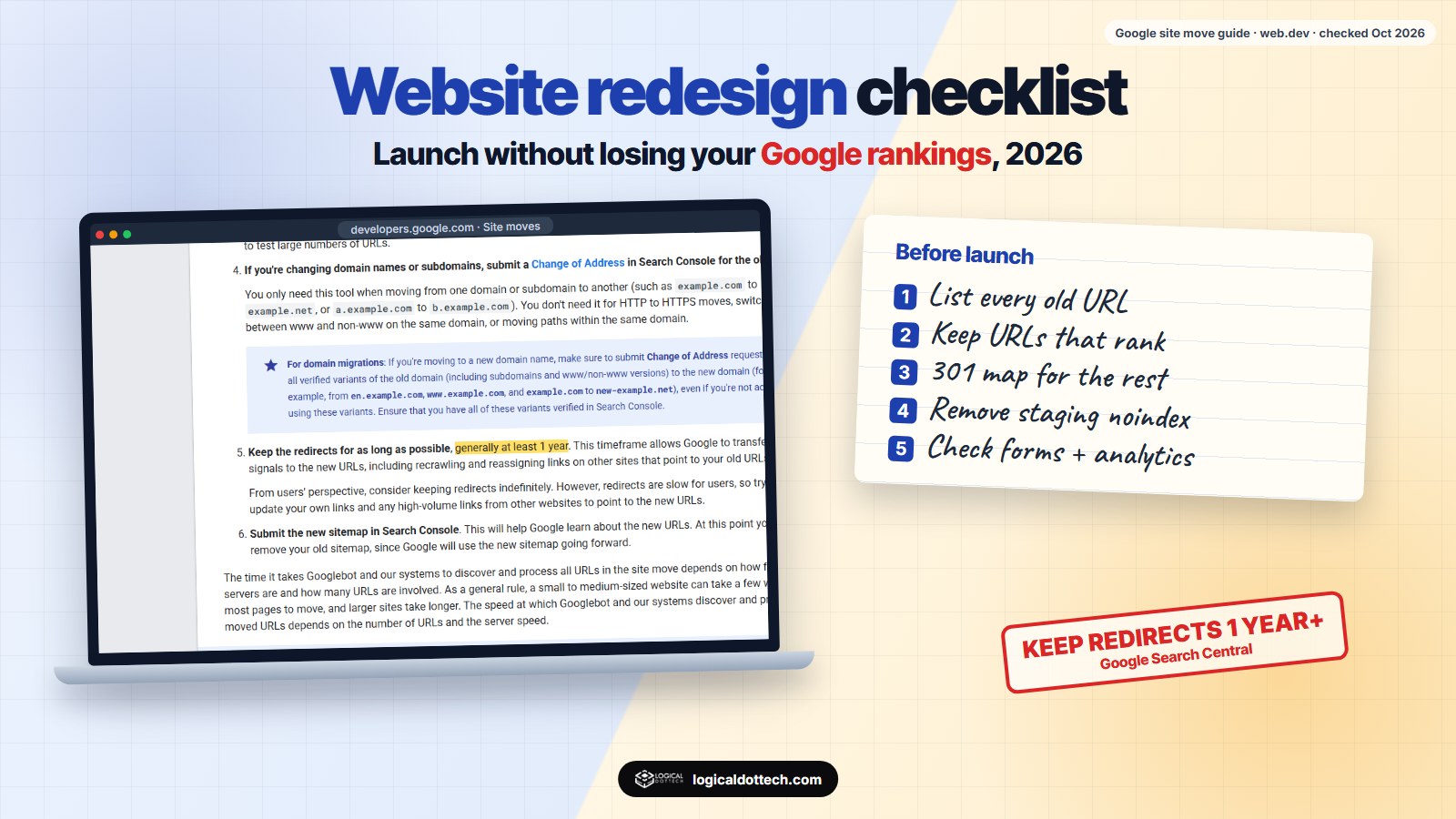
Short answer: a website redesign is worth it when the site is slow, hard to use on a phone, hard to update or not bringing enquiries. The risk is losing Google traffic, and it comes mostly from changed page addresses and removed content. List every old URL before you start, keep URLs the same where you can, 301-redirect the rest for at least a year as Google advises, keep the content that ranks, and check the site on launch day for blocked indexing, broken forms and a missing analytics tag.
We redesign websites often, and the redesigns that go wrong usually fail on launch day, not in the design. This checklist covers when to redesign and how to launch without losing the traffic you already have. The technical points come from Google’s own documentation, checked on 20 October 2026.
Do you need a redesign or a refresh?
| Sign | Usually means |
|---|---|
| Text too small, buttons hard to tap on a phone | Redesign of the layout |
| Pages slow to load | Start with speed fixes; redesign if the theme itself is the problem |
| You need the developer to change a phone number | Redesign on an editable platform |
| Old prices, services, team or photos | Refresh the content |
| Visitors arrive but do not call or fill the form | Fix the pages people land on and the calls to action |
| Platform, theme or plugins no longer updated | Redesign or rebuild, for security |
| Your business, services or brand have changed | Redesign |
A refresh keeps the structure and fixes content and speed. It is cheaper and carries almost no ranking risk. Choose a full redesign only when the structure or platform is the problem.
What does “fast enough” mean?
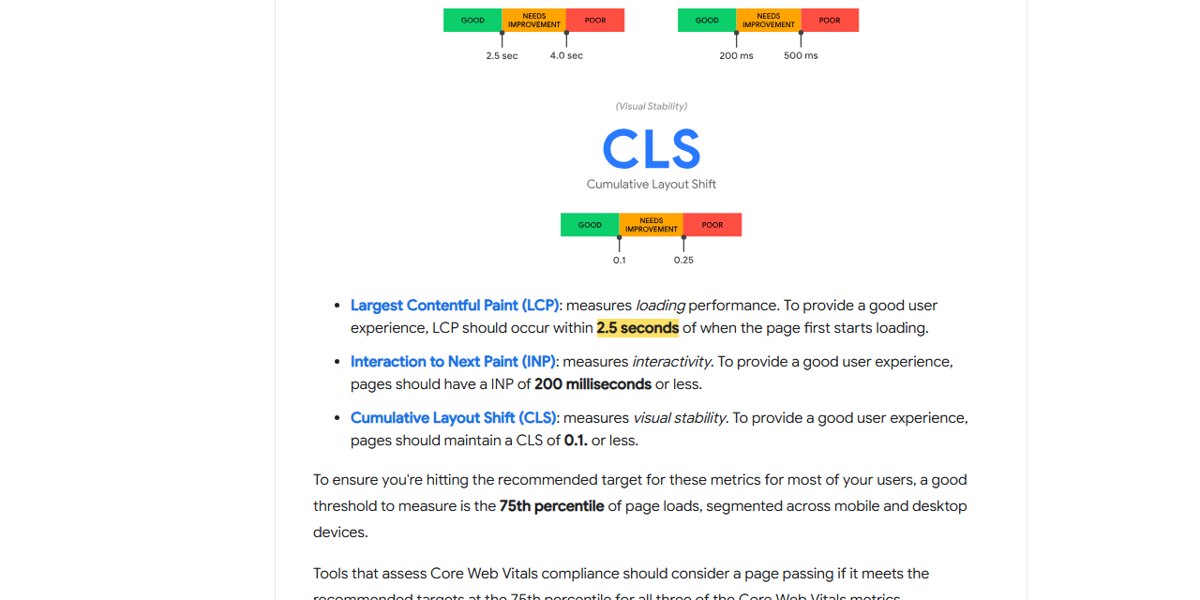
Google measures page experience with three Core Web Vitals:
| Metric | What it measures | Good |
|---|---|---|
| LCP, Largest Contentful Paint | How fast the main content appears | 2.5 seconds or less |
| INP, Interaction to Next Paint | How fast the page responds to a tap or click | 200 ms or less |
| CLS, Cumulative Layout Shift | How much the layout jumps while loading | 0.1 or less |
Google says to measure at the 75th percentile of visits, separately for mobile and desktop. Set these as targets for the new design, and test with Google’s PageSpeed Insights before launch.
Why do redesigns lose rankings?
- Page addresses change with no redirects. Old links and Google’s index point to pages that no longer exist.
- Pages that ranked are dropped or cut down. The new design has “cleaner” pages with half the text that used to answer the search.
- The new site is blocked from search engines. The “discourage search engines” box or a noindex tag from the test site goes live.
- Titles and headings are rewritten for style. The words people searched for disappear.
- Tracking is lost. The analytics tag or Search Console verification is not carried over, so nobody notices the drop for weeks.
The redesign checklist
Before you design
- List every current URL. Google’s site move guide suggests building the list from your sitemap, server logs and analytics. Add the list of pages from Search Console.
- Mark the pages that matter. In Search Console, export the pages and searches that bring clicks and impressions. These keep their content and, ideally, their URL.
- Decide the new URL for each old one. Keep the same URL where you can. Where it must change, write down the new one. This is your redirect map.
- Keep a full backup of the old site and its database.
While building
- Build on a staging copy that search engines cannot index, and write down how it is blocked so you can remove it at launch.
- Carry the content over. Keep the text, headings and FAQs that answer what people search, then improve them.
- Keep titles and meta descriptions of ranking pages unless you have a clear reason to change them.
- Carry over structured data, such as LocalBusiness and FAQ markup, and the image alt text.
- Test speed against the Core Web Vitals targets on a phone.
On launch day
- Remove the staging block. In WordPress, untick “Discourage search engines from indexing this site”, and check for noindex tags.
- Set up 301 redirects from every old URL in your map, and test a sample by hand.
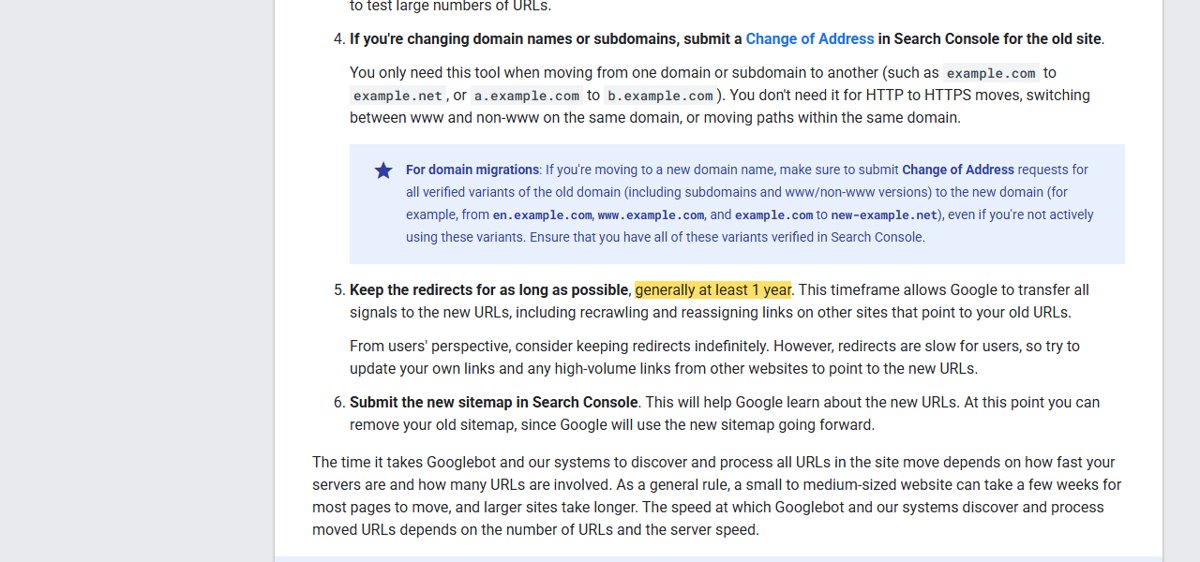
- Submit the new sitemap in Search Console.
- Check the analytics tag on several pages, and Search Console verification.
- Test every form, the call and WhatsApp buttons, and any booking or payment.
For the next eight weeks
- Check Search Console weekly for pages not found and for drops in clicks on your important pages.
- Expect some movement. Google says rankings may fluctuate while it recrawls, and a small to medium site can take a few weeks for most pages to move.
- Keep the redirects for at least a year, as Google advises, and update your own internal links to the new URLs.
Common redesign mistakes
| Mistake | What to do instead |
|---|---|
| Changing every URL “to make them cleaner” | Keep URLs that work; change only what must change |
| Redirecting every old page to the home page | Redirect each old page to its closest new page |
| Cutting long service pages to two lines | Keep the content that answers searches, laid out better |
| Launching on a Friday evening | Launch early in the week, when someone can fix problems |
| Changing domain and design at the same time | Do one move at a time |
If you want a redesign handled this way, from the redirect map to the launch checks, see our website design and development service. Before hiring anyone, read how to choose a website development company. Book a free 30-minute call and we will look at your current site and tell you whether it needs a redesign or a refresh.
Common questions
Will a website redesign hurt my Google rankings?
It can, if page addresses change without redirects or pages that ranked lose their content. Google says rankings may fluctuate while it recrawls a moved site, and a small to medium site can take a few weeks. Keeping URLs where you can, redirecting the rest with 301s and keeping the content that ranks keeps the risk low.
How long should I keep 301 redirects after a redesign?
Google’s site move guide says to keep redirects for as long as possible, generally at least one year, so it can move all signals to the new URLs. For visitors, keeping them indefinitely is fine.
How do I know if my website needs a redesign?
Common signs: it is hard to use on a phone, pages load slowly, you cannot update it yourself, the information is out of date, visitors do not call or fill the form, or the platform no longer gets security updates. If only one or two of these apply, a refresh may be enough.
What is a good page speed for a website?
Google’s Core Web Vitals say a good page loads its main content (LCP) within 2.5 seconds, responds to taps (INP) within 200 milliseconds, and has a layout shift (CLS) of 0.1 or less, measured at the 75th percentile of visits.
Should I change my domain name during a redesign?
Only if you have a strong reason. A domain change is a bigger move: you need redirects from every old URL and the Change of Address tool in Search Console. Doing a redesign and a domain change at the same time makes problems harder to trace.
What should I check right after launching a redesigned website?
That the site is not blocked from search engines, the redirects work, the new sitemap is submitted in Search Console, forms send to the right inbox, the analytics tag is on every page, and the pages that used to bring traffic still exist.
Sources checked on 20 October 2026: Google Search Central, site moves with URL changes and web.dev, Web Vitals.